
CMIS transceiver programming & breakout configuration guide.
- published
- 2026-02-22
- read_time
- 25 min
- author
- Wave2Wave Engineering Team
- reviewer
- Mark Crandon, CEO
Download the complete 53-page reference
Full register tables, all 10 configuration examples, APSEL activation procedure, and supplier programming template.
01Introduction & terminology
The Common Management Interface Specification (CMIS) defines how high-speed optical transceivers communicate with switches and NICs. For 400G and 800G deployments, CMIS application descriptors control which configurations a module supports - from straight connections to complex multi-way breakouts. Understanding these settings is essential for ordering the right modules and deploying them correctly across 800G OSFP and QSFP-DD transceivers.
This guide covers all CMIS-based form factors (OSFP, QSFP-DD, QSFP112, QSFP56, QSFP28), both Ethernet and InfiniBand protocols, and cable types including AOC, DAC, and AEC. Source references: SFF-8024 Rev 4.13 (July 2025) and OIF-CMIS-05.2 (April 2022).
Key Terms
| Term | Definition |
|---|---|
| CMIS | Common Management Interface Specification - OIF-CMIS-05.2 (April 2022) |
| Host Code | Electrical interface code for switch-side SerDes |
| Media Code | Optical/copper interface code for fiber/cable side |
| Lane Count | Host:Media lane mapping (e.g., 0x88 = 8 host lanes : 8 media lanes) |
| Lane Assignment | How lanes are grouped for breakout configurations |
| APSEL | Application Select - which application descriptor to activate |
| Breakout | Splitting a high-speed port into multiple lower-speed ports |
02Module types: DR vs FR vs SR
Understanding the optical type is essential for matching modules to deployment requirements. The module type determines reach, fiber count, and available breakout options.
| Type | Full Name | Reach | Fiber Count | Best For |
|---|---|---|---|---|
| DR | Direct Detect | 500m | Parallel (8 or 16 fibers) | Intra-building, same data hall |
| DR-2 | Direct Detect Extended | 2,000m | Parallel (8 or 16 fibers) | Extended intra-campus backbone |
| FR | Far Reach (WDM) | 2,000m | 2 fibers (wavelength mux) | Building-to-building, limited fiber |
| LR | Long Reach (WDM) | 10,000m | 2 fibers (wavelength mux) | Campus-to-campus, metro DCI |
| SR | Short Reach (MMF) | 100m | Parallel multimode | Short-reach, existing OM3/OM4 |
FR and LR modules use wavelength-division multiplexing - 4 wavelengths on 2 fibers. These wavelengths cannot be split into individual channels, so FR/LR modules generally do not support breakout configurations. Use DR modules for breakout deployments.
03Ethernet vs InfiniBand host codes
The host electrical interface code tells the switch ASIC which protocol stack to use. Using the wrong host code will cause the module to fail initialization.
| Protocol | 800G | 400G | 200G | 100G |
|---|---|---|---|---|
| Ethernet | 0x52 (800GAUI-8-L) | 0x50 (400GAUI-4-L) | 0x4E (200GAUI-2-L) | 0x4C (100GAUI-1-L) |
| InfiniBand NDR | 0x32 (IB NDR) | 0x32 (IB NDR) | - | - |
| InfiniBand HDR | - | - | 0x31 (IB HDR) | - |
| InfiniBand EDR | - | - | - | 0x30 (IB EDR) |
- —InfiniBand NDR uses the same host code (
0x32) for both 800G and 400G. The lane count byte (0x88vs0x44) determines the speed. - —Media codes are shared between Ethernet and InfiniBand. A DR8 module uses media code
0x56regardless of protocol. - —An InfiniBand module (host code
0x32) will NOT work in an Ethernet switch.
Common Deployments
| Platform | Protocol | Host Code | Example Use Case |
|---|---|---|---|
| Arista, Cisco, Juniper | Ethernet | 0x52, 0x50, etc. | Data center spine, leaf |
| NVIDIA GB300 | InfiniBand NDR | 0x32 | AI/ML GPU compute |
| NVIDIA DGX H100 | InfiniBand HDR | 0x31 | HPC compute |
04Deployment configuration checklist
Before ordering or programming any module, gather these answers. Each question maps to a specific register value or physical constraint.
Switch & Port
- —What is the switch make, model, and OS version?
- —What port cage form factor? (OSFP, QSFP-DD, QSFP28)
- —What is the port cage power budget (watts)?
- —What CMIS revision does the switch support? (3.x, 4.x, 5.0, 5.1, 5.2)
Protocol & Speed
- —Ethernet or InfiniBand? If IB, what generation? (EDR, HDR, NDR)
- —What is the target line rate per port? (100G, 200G, 400G, 800G)
- —Is breakout required? If yes, how many ports at what speed?
Fiber & Reach
- —What is the distance between endpoints? (determines DR/FR/SR)
- —Single-mode (SMF) or multimode (MMF) fiber plant?
- —What connector is on the patch panel? (MPO-16, MPO-12, LC)
The full 26-question questionnaire with validation cross-checks and a supplier programming specification template is included in the complete PDF guide.
Wave2Wave custom engineering programs transceivers to your exact vendor spec as part of our factory kitting service.
05Transceiver module configurations
Select a form factor below to see the most common CMIS configurations. Each row shows the exact host code, media code, lane count, and lane assignment values that must be programmed into the module's Application Descriptors.
OSFP (Octal SFP) is the primary form factor for 800G deployments. Module identifier: 0x19. Supports up to 20W power and 8-lane breakout configurations.
800G DR8 - Ethernet
| Configuration | Speed | Host Code | Media Code | Lane Count | Lane Assign | Use Case |
|---|---|---|---|---|---|---|
| 1x800G (straight) | 800G | 0x52 | 0x56 (DR8) | 0x88 | 0x01 | Spine-to-spine |
| 2x400G (split) | 400Gx2 | 0x50 | 0x1C (DR4) | 0x44 | 0x11 | Spine-to-leaf |
| 4x200G (breakout) | 200Gx4 | 0x4E | 0x17 (DR4) | 0x22 | 0x55 | ToR to server |
| 8x100G (breakout) | 100Gx8 | 0x4C | 0x14 (DR) | 0x11 | 0xFF | Legacy connectivity |
800G DR8 - InfiniBand NDR
InfiniBand NDR uses host code 0x32 for both 800G and 400G. The lane count byte determines the speed.
| Configuration | Speed | Host Code | Media Code | Lane Count | Lane Assign | Use Case |
|---|---|---|---|---|---|---|
| 1x800G (straight) | 800G | 0x32 | 0x56 (DR8) | 0x88 | 0x01 | GB300 compute port |
| 2x400G (split) | 400Gx2 | 0x32 | 0x1C (DR4) | 0x44 | 0x11 | Dual-port compute |
Other OSFP 800G Variants
| Configuration | Speed | Host Code | Media Code | Lane Count | Lane Assign | Use Case |
|---|---|---|---|---|---|---|
| 1x800G FR4 | 800G | 0x52 | 0x7A (FR4) | 0x48 | 0x01 | Building-to-building |
| 1x800G SR8 | 800G | 0x52 | 0x12 (SR8) | 0x88 | 0x01 | Short-reach MMF |
| 1x800G DR8-2 | 800G | 0x52 | 0x57 (DR8-2) | 0x88 | 0x01 | Campus backbone, 2km |
| 1x800G LR4 | 800G | 0x82 | 0x7B (LR4) | 0x48 | 0x01 | Metro DCI, 10km |
06Cable types: AOC vs DAC vs AEC
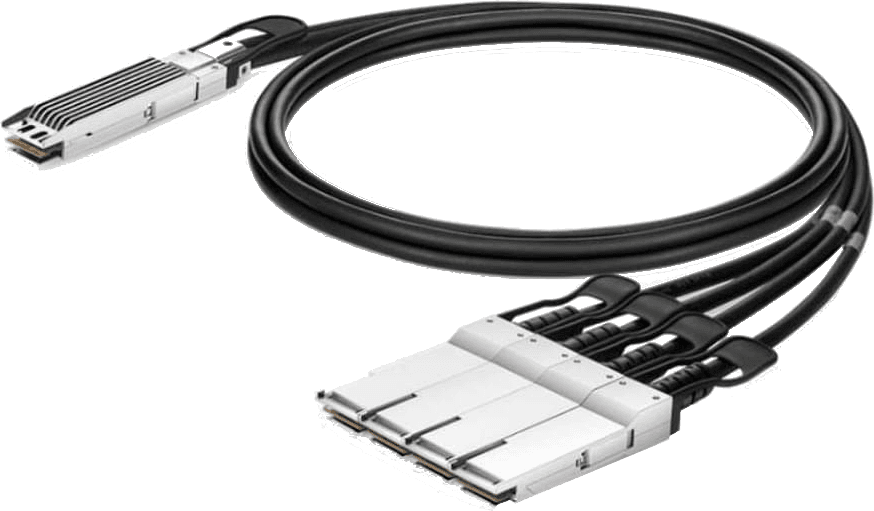
In addition to transceiver modules with separate fiber patch cords, data centers use integrated cable assemblies. Each type has distinct CMIS media codes and physical characteristics. Browse our full selection of CMIS 5.0-compliant 800G and 400G active cables.
| Type | Medium | Media Code | Max Reach | Power | Best Use |
|---|---|---|---|---|---|
| AOC (Active Optical) | Fiber | 0x02 | 100m | 1-3W/end | Cross-row, inter-rack |
| DAC (Direct Attach Copper) | Copper | 0x04 | 2-5m | 0W (passive) | Same-rack, lowest latency |
| AEC (Active Electrical) | Copper | 0x03 | 7m | 0.5-2W/end | Adjacent racks, copper extended |
| ACC (Active Copper) | Copper | 0x03 | 7m | 0.5-2W/end | Synonymous with AEC in many contexts |
DAC (passive copper) offers the lowest latency. AEC/ACC adds a small amount due to re-timers. AOC adds the most due to optical conversion. For AI/ML workloads where nanoseconds matter, DAC is preferred when reach allows.
07Physical breakout reference
A breakout splits one high-speed port into multiple lower-speed connections. These diagrams show which combinations work physically. For breakout deployments requiring MPO-16 fiber infrastructure, ensure your patch panel connectors match.
800G OSFP Breakout Patterns
800G OSFP Breakout Options
===========================

1x800G (straight)
  [800G OSFP]========== 800G ==========[800G OSFP]
              MPO-16

2x400G (split) - Lane Assignment: 0x11
  [800G OSFP]=== 400G ===[400G QSFP-DD] (Leaf A)
  [Lanes 0-3]=== 400G ===[400G QSFP-DD] (Leaf B)
  [Lanes 4-7]

4x200G (breakout) - Lane Assignment: 0x55
  [800G OSFP]== 200G ==[200G QSFP56] (Server A)
  [Lanes 0-1]== 200G ==[200G QSFP56] (Server B)
  [Lanes 2-3]== 200G ==[200G QSFP56] (Server C)
  [Lanes 4-5]== 200G ==[200G QSFP56] (Server D)
  [Lanes 6-7]

8x100G (breakout) - Lane Assignment: 0xFF
  [800G OSFP]- 100G -[100G QSFP28] x8 (Devices 1-8)
  [8 Lanes  ]  (1 lane each)
400G QSFP-DD Breakout Options
===============================
1x400G (straight)
[400G QSFP-DD]======= 400G ========[400G QSFP-DD]
MPO-12
2x200G (split) - Lane Assignment: 0x11
[400G QSFP-DD]== 200G ==[200G QSFP56] (NIC Port A)
[Lanes 0-1 ]== 200G ==[200G QSFP56] (NIC Port B)
[Lanes 2-3 ]
4x100G (breakout) - Lane Assignment: 0x55
[400G QSFP-DD]- 100G -[100G QSFP28] x4 (Servers 1-4)
[4 Lanes ] (1 lane each)Connector Types
| Speed / PMD | Parallel Connector | WDM Connector | Fiber Count |
|---|---|---|---|
| 800G DR8 | MPO-16 | - | 16 (8 Tx + 8 Rx) |
| 800G 2xDR4 | 2xMPO-12 | - | 8+8 (one MPO-12 per engine) |
| 800G FR4 / LR4 | - | LC Duplex | 2 (4 WDM wavelengths) |
| 400G DR4 | MPO-12 | - | 8 (4 Tx + 4 Rx) |
| 400G FR4 / LR4-6 | - | LC Duplex | 2 |
| 100G DR / FR1 / LR1 | - | LC Duplex | 2 |
08Configuration examples
Each example shows the exact CMIS register values for a real-world deployment scenario. Expand an example to see the register addresses, hex values, and verification notes.
5 additional examples with register-level values are included in the full PDF guide.
The CB-1 Transceiver Programming Module provides a GUI for viewing and editing complete CMIS memory maps across OSFP, QSFP-DD, and all supported form factors.
09CLI verification commands
After deploying a CMIS-programmed module, verify the configuration from the switch CLI. These commands confirm that the module's application descriptors are accepted and all lanes are active.
| Task | Cisco NX-OS | Arista EOS | NVIDIA MLNX-OS |
|---|---|---|---|
| APSEL / App Descriptors | show hw internal linkctrl xcvr fcot-info front-port <PORT> raw | show interfaces Eth<PORT> transceiver properties | mlxlink -d <DEV> -p <PORT> --cable |
| Lane State / Datapath | show hw internal linkctrl xcvr lane-state-info front-port <PORT> | show interfaces Eth<PORT> hardware detail | mlxlink -d <DEV> -p <PORT> |
| Transceiver Details | show interface Eth1/<PORT> transceiver details | show interfaces Eth<PORT> transceiver detail | show interfaces ethernet 1/<PORT> transceiver details |
| Interface Status | show interface Eth1/<PORT> brief | show interfaces Eth<PORT> status | show interfaces ethernet 1/<PORT> |
| Optical Power (DOM) | show interface Eth1/<PORT> transceiver details | show interfaces Eth<PORT> transceiver dom | mlxlink -d <DEV> -p <PORT> --show_fec |
PASS / FAIL Criteria
| Condition | Verdict | Action |
|---|---|---|
| All lanes CONFIG_ACCEPTED + ACTIVATED | PASS | Proceed with installation |
| All lanes CONFIG_ACCEPTED + INITIALIZED | PASS (warming up) | Wait 30 seconds, re-check |
| Some lanes ACCEPTED, some REJECTED | FAIL | Stop. Contact W2W Engineering with lane-state output. |
| Module state = MODULE_LOW_POWER | WAIT | Module is initializing. Wait 60 seconds. |
The full 53-page PDF includes content not covered on this page:
- —Complete Ethernet & InfiniBand Application Tables (all hex codes)
- —Full CMIS Register Reference (Page 0x00, 0x01 register maps)
- —All 10 configuration examples with register-level values
- —APSEL Activation Procedure for CMIS 5.x
- —Supplier Programming Specification Template
Related articles.
Need help with CMIS programming or transceiver configuration?
Our optical engineering team can help with CMIS programming, multi-vendor compatibility, and custom transceiver specifications for your deployment.